Table of Contents
#
Layout of Python installations
All paths in the table are relative to the installation root:
| Files | Windows | Linux and macOS | Notes |
|---|---|---|---|
| Interpreter | python.exe | bin/python3.x | |
| Standard library | Lib and DLLs | lib/python3.x | Extension modules are located under DLLs on Windows. Fedora places the standard library under lib64 instead of lib. |
| Third-party packages | Lib\site-packages | lib/python3.x/site-packages | Debian and Ubuntu put packages in dist-packages. Fedora places extension modules under lib64 instead of lib. |
| Entry-point scriptsa | Scripts | bin |
#
The interpreter
The Python interpreter ties the environment to three things:
- A specific version of the Python language (e.g., 2.x.y, 3.x.y)
- A specific implementation of Python (e.g., CPython, PyPy)
- A specific build of the interpreter (e.g., 32bit, 64bit, Intel or Apple)
Try this command (in Bash) to print metadata complied into the interpreter:
python3 -m sysconfig
#
The modules
Modules are containers of Python objects that you load via the import statement.
Modules come in various forms and shapes:
Simple modules In the simplest case, a
moduleis a single file containing Python source code. The statementimport stringexecutes the code in string.py and binds the result to the namestringin the local scope.Packages Directories with init.py files are known as packages which allow you to organize modules in a hierarchy. The statement
import email.messageloads themessagemodule from theemailpackage.Namespace packages Directories with modules but no init.py are known as namespace packages. One may use them to organize modules in a common namespace such as a company name (say
dsta.voicedspanddsta.vedioprepr). Unlike with regular packages, one can distribute each module in a namespace package separately.Extension modules Extension modules such as
mathmodule, contain native code compiled from low-level language like C. They are shared libraries with a special entry-point1 that lets you import them as modules from Python. People write them for performance reasons or to make existing C libraries available as Python modules. Their names end in.pydon Windows,.dylibon macOS, and.soon Linux.Built-in modules Some modules from the standard library, such as
sysandbuiltinsmodules, are compiled into the interpreter. The variablesys.builtin_module_nameslists all of these modules.Frozen modules Some modules from the standard library are written in Python but have their bytecode2 embedding in the interpreter. Recent versions of Python freeze every module that’s imported during interpreter startup, such as
osandio.
#
Python virtual environment
Python environments consist of an interpreter and modules. Virtual environments share the interpreter and the standard library with their parent environment.
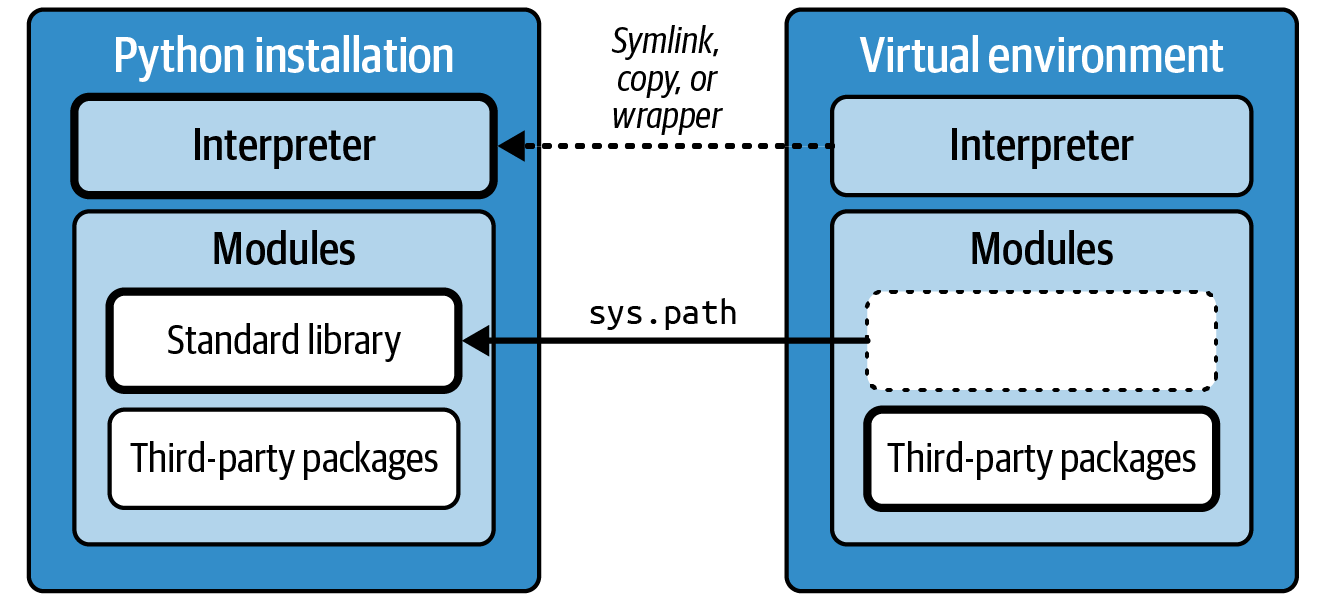
A Python environment can contain only a single version of each third-party package – if two projects require different versions of the same package, they can’t be installed side by side. That’s why it’s considered good practice to install every Python application, and every project you work on, in a dedicated virtual environment.
NOTE The term package carries some ambiguity in the Python world. It refers both to modules and to the artifacts used for distributing modules (aka distributions).
#
The module path
It’s helpful to look at entries of sys.path to debugg the import error, naturally,
one may wonder where do the entries on sys.path come from at first?
When the interpreter starts up, it constructs the module path in two steps:
- It builds an initial module path which includes the standard library,
- It imports the
sitemodule (from standard library) which extends the module path to include the site packages from the current environment.
The locations on the initial module path fall into three categories, and they occur in this order:
The current directory or the directory containing the Python scripts (if any) The first item on
sys.pathcan be any of the following:- If you ran
python3 <script>, the directory where the script is located - If you ran
python3 -m <module>, the current directory - Otherwise, the empty string, which also denotes the current directory
Safty issue: having the working directory on
sys.pathis quite unsafe, as an attacker (or you, mistakenly) can override the standard library by placing Python files in the victim’s directory. To avoid this,
- Python-3.11 provides
-Poption or the PYTHONSAFEPATH variable to omit the current directory fromsys.path; - Using a virtual environment.
- If you ran
The locations in the PYTHONPATH environment variable (if set) Avoid this mechanism for the same reasons as the current working directory and use a virtual environment instead.
The locations of the standard library The location of the standard library is not hardcoded in the interpreter. Rather, Python looks for landmark files on the path to its own executable and uses them to locate the current environment (
sys.prefix) and the Python installation (sys.base_prefix). One such landmark file is pyvenv.cfg, which marks a virtual environment and points to its parent installation via thehomekey. Another landmark file is os.py, the file containing the standardosmodule: Python uses os.py to discover the prefix outside a virtual environment and to locate the standard library itself.
For more glory details and interesting contents, go to the newest version (2024) of “Hypermodern Python Tooling” by Claudio Jolowicz.
An entry-point script is an executable file in Scripts/ (Windows) or bin/ (Linux and macOS) with a single purpose: it launches a Python application by importing the module with its entry-point function and calling that function. ↩︎
Bytecode is an intermediate representation of Python code that is platform-independent and optimized for fast execution. The interpreter compiles pure Python modules to bytecode when it loads them for the first time. Their names end in
.pycand they are cached in__pycache__directories. ↩︎